When AI Jewelry Retouching Changes the Product
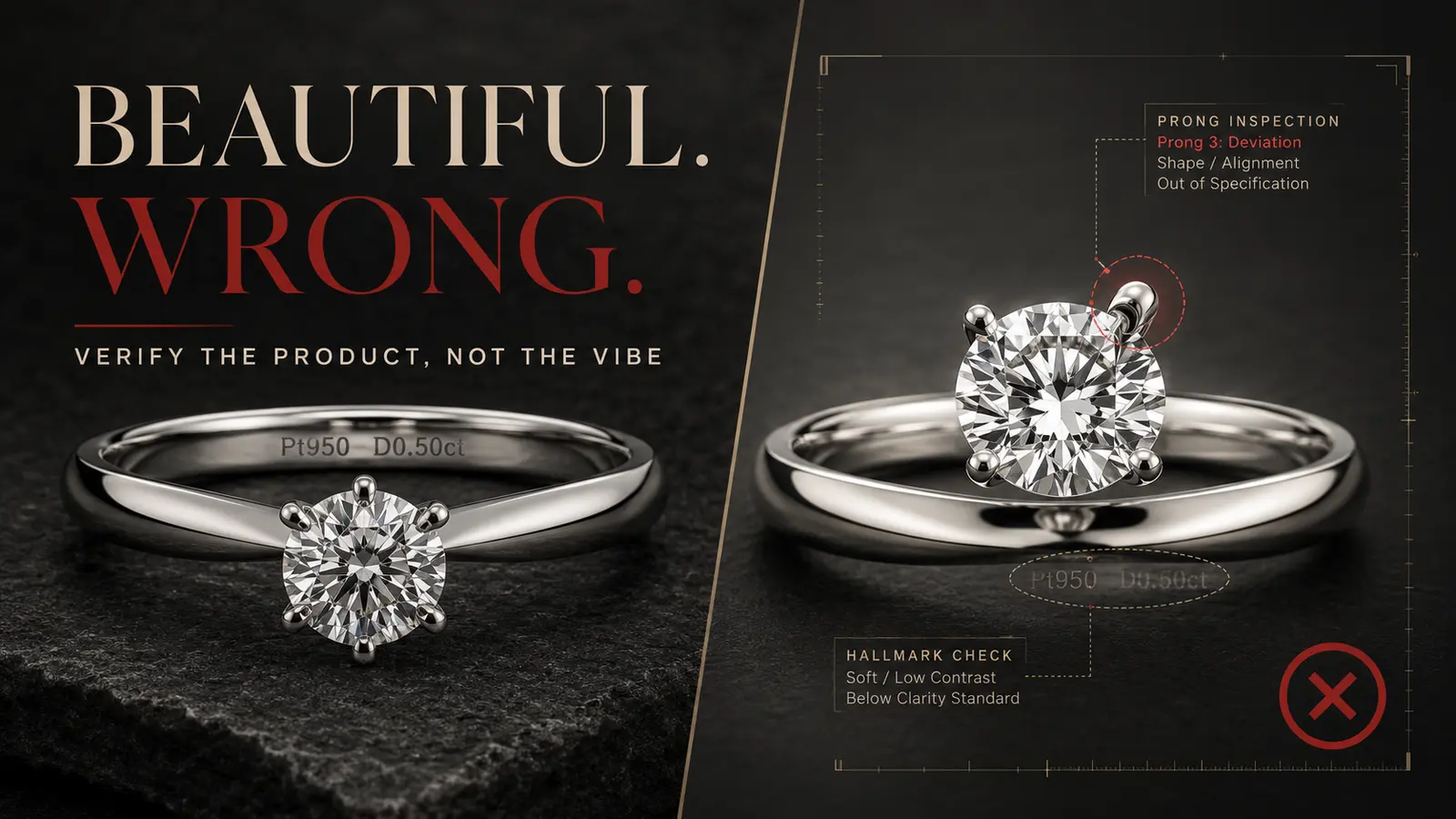
Picture a plausible launch-day scene.
The new ring image looks better than the source. The metal is cleaner. The diamond catches more light. The background finally matches the rest of the collection. Everyone reviewing the grid prefers the edit.
Then someone opens the product page at full size and notices the problem: one prong is softer than the others. A tiny hallmark has disappeared. The center stone looks a little wider. Nothing feels obviously fake, but the image is no longer a faithful record of the ring being sold.
That scene is a composite, not a customer story. But the failure mode is real enough to design around: an AI edit can be visually persuasive and still be wrong for a product page.
The answer is not to reject AI jewelry retouching. It is to stop approving edits by vibe.
The dangerous question is “Does this look better?”
Jewelry teams naturally look for polish. We want a clean background, controlled reflections, crisp edges, and enough contrast to make a small object readable on a phone.
But “better” is not a product-fidelity test.
A product image has two jobs at once:
- Present the piece clearly and attractively.
- Preserve the details a reasonable buyer would use to understand what they are buying.
That second job matters beyond aesthetics. Google Merchant Center says a main product image should accurately display the product, and it requires generative-AI images to retain appropriate source-type metadata. The US Federal Trade Commission’s general advertising guidance says advertising must be truthful and not misleading; its small-business guidance focuses on whether a representation or omission is likely to mislead a reasonable consumer and is material to a purchase decision.
Those policies do not provide a jewelry retouching checklist. They do give us a useful operating principle: enhancement should not quietly become substitution.
Start by separating presentation from product truth
I use a simple boundary.
Presentation details can often change without changing what the customer is buying. Think background, crop, canvas size, dust outside the piece, or a distracting reflection from the photography setup.
Product-truth details describe the item itself. For jewelry, that includes:
- silhouette and proportions
- stone count, shape, and placement
- prongs, bezels, links, clasps, and settings
- engravings, hallmarks, and maker marks
- metal color and finish
- gemstone hue, zoning, inclusions, and translucency
- intentional texture, wear, or handmade irregularity
- scale relationships between the piece and any model or prop
The border is not always neat. A reflection may hide a scratch that should be removed, or it may define the curve of a polished band. “Clean up the reflection” is therefore not a safe instruction by itself. The review has to ask what visual information that reflection carries.
This is where generic quality language gets risky. NeuroViz, for example, publicly describes jewelry retouching that can polish metal while preserving gemstone faceting and inclusions. That is the right tension to name: cleanup and preservation are separate goals. A strong result needs both.
Build one source-of-truth frame before editing
Before generating anything, choose the frame that will serve as the factual reference for the SKU.
It should be the clearest available source image, not necessarily the prettiest one. If no single image shows every critical detail, make a small reference set: front, side, back, hallmark, clasp, and a scale cue. Label the files with the SKU and keep them outside the export folder so nobody confuses a generated output with a source.
Then record five facts before the first edit:
- expected stone count and setting style
- dimensions or known proportion cues
- metal and finish
- gemstone identity and intended color description
- marks or construction details that must remain visible
This takes a few minutes. It also turns a subjective review into a comparison against something concrete.
If your team is still choosing tools, the existing guide to AI image editing tools for jewelry photos explains where general and jewelry-specific workflows differ. The QA method here starts after that choice: whatever tool you use, the source frame remains the authority.
The fidelity-first review: preserve, compare, decide
The workflow has three passes. Run them in order. Do not start with “Which image looks more premium?”
Pass 1: Preserve the non-negotiables
Write the edit request so it names both the desired change and the details that must not move.
For example:
Clean the background and reduce distracting reflections. Preserve the ring silhouette, stone count, prong geometry, hallmark, metal color, engraving, and all gemstone features.
This is not a guarantee. It is a better specification and a better audit trail.
Keep the original file, the instruction, the tool or model name, the output, and the review decision together. If the output will be used in Google Merchant Center, preserve the relevant generative-AI metadata rather than stripping it during export.
Pass 2: Compare by risk zone
Review the source and output side by side at fit-to-screen, 100%, and a closer crop. A simple flicker comparison or aligned overlay makes small geometry changes easier to see.
Move through the piece in the same order every time:
- Outer silhouette: Did the width, curvature, chain length, or overall shape change?
- Construction: Did a prong merge, a link disappear, or a clasp become ambiguous?
- Stones: Are the count, cut, spacing, and orientation intact?
- Surface: Were engravings, hallmarks, texture, or intentional irregularities removed?
- Material: Does the metal still read as the listed metal and finish?
- Gem character: Did hue, inclusions, zoning, or transparency become a different-looking stone?
- Scale: If the item is on a model or prop, does it retain a defensible size relationship?
- Edges and background: Are there halos, clipped gaps, repeated pixels, or invented shadows?
Do not rely on memory. The source stays visible through the entire pass.
Pass 3: Put the output in one of three queues
Every image gets one status:
- Keep: presentation improved and no product-truth detail changed.
- Review: a change may be harmless, but the reviewer cannot confirm it from the reference set.
- Reject: the output adds, removes, relocates, recolors, or reshapes a material product detail.
“Review” is not a softer version of keep. It is a blocked state. The smallest next step might be checking another source angle, asking the maker, or regenerating with a tighter instruction. If the question cannot be resolved, use the original or send the image to a human retoucher.
A 90-second fidelity card for each final image
Teams do not need a giant approval form. A compact card is enough if it forces the right checks.
Use this before a product image reaches the publish folder:
- SKU and source frame match
- silhouette and proportions match
- stone count, cut, spacing, and setting match
- prongs, links, clasps, and construction match
- hallmark, engraving, and texture are preserved
- metal color and finish match the listing
- gemstone character has not been substituted
- scale cues remain defensible
- no halos, clipped gaps, repeated details, or invented shadows
- edit instruction, tool, output, reviewer, and decision are recorded
- required AI provenance metadata is preserved for the destination
The card is intentionally product-first. Catalog consistency belongs in the process, but a perfectly consistent grid of inaccurate images is still inaccurate.
Use different rules for PDP and campaign images
Not every image carries the same burden.
A product-detail-page image should be conservative. It sits close to the item description, price, variant selector, and buy button. Buyers reasonably use it as evidence.
A campaign image can be more expressive, but it still needs a clear relationship to the real piece. Backgrounds, props, lighting, and composition can move further. Product geometry should not quietly become a new design.
When the creative concept intentionally imagines a different material or gemstone, treat it as a concept or verified variant—not as a retouched photograph of the source SKU. That distinction protects the buyer and makes the internal workflow easier to audit.
This is also why high-quality product photography matters in the first place. The goal is not merely polish; it is confidence. The article on why high-quality jewelry photos sell more covers that broader commercial case. Fidelity is the operational layer underneath it.
The useful enemy is approval by vibe
AI can remove tedious work from jewelry image production. It can also produce a result so coherent that reviewers stop looking for small factual changes.
That is the enemy: not the model, not automation, and not enhancement. The enemy is a workflow where “looks great” is the only acceptance criterion.
Keep a source-of-truth frame. Name the details that cannot change. Compare risk zones in a fixed order. Route uncertainty to review instead of allowing it to drift into approval.
If you want to test that workflow on a jewelry image, open Poliro and start with one carefully documented SKU. The best first test is not the easiest piece. It is the one whose prongs, finish, stones, or marks would quickly reveal whether your process is protecting product truth.
Sources and further reading
- Google Merchant Center: Image link requirements
- Google Merchant Center: Product data specification
- FTC: Truth in Advertising
- FTC: Advertising FAQs for Small Business
- NeuroViz Academy: Hi-End Jewelry Retoucher Pro tutorial
Thanks for reading. I would rather publish one honest image than approve ten beautiful guesses.
— Kristijan G
Ready to enhance your next jewelry photo?
Studio-quality results in seconds. Free to start. No card required.
One concise email. Unsubscribe anytime.
Related Articles
How to Add Sparkle to Jewelry Photos Without Faking the Stone
A practical protocol for enhancing jewelry sparkle while preserving facet patterns, stone identity, and product truth.

How to Export Jewelry Photos for Shopify, Etsy, and Amazon
A practical jewelry export matrix for choosing JPEG, PNG, or WebP without losing transparent edges, metal tone, gemstone detail, or marketplace compatibility.
How to Photograph Gemstones Before AI Enhancement
A practical six-frame source-photo protocol for preserving gemstone color, facets, inclusions, scale, and setting details before AI enhancement.